

AirPrompter documentation
Connect an AI host to AirPrompter
Choose the right connector, authorize it safely, prove workflow discovery works, and understand what the host—not AirPrompter—executes.
Availability varies
AirPrompter Connect lets a supported AI host discover and use saved prompts or workflows through an authenticated Model Context Protocol (MCP) connection. MCP is the standard the host uses to request AirPrompter actions; the host still performs the AI generation with the context and capabilities available in its conversation.
Choose Connect or the browser extension
| Choose | Best when | Execution behavior |
|---|---|---|
| Browser extension | You work inside a supported browser AI chat and want visible step controls, Send/Copy, and optional Run All. | The extension coordinates the saved sequence beside that browser tab. |
| Connect | The AI host supports an AirPrompter connector, plugin, skill, or remote MCP path and should discover a workflow by name. | The host calls AirPrompter tools, receives the saved instruction, and executes it in the host conversation. |
The web Library remains the canonical place to inspect and organize the saved system. Use the connected host to discover or run what the connection permits. An eligible OAuth connection may also create or update prompts and workflows when that host exposes the required write action and permission.
Before you connect
You need:
- an AirPrompter account containing at least one clearly named prompt or workflow;
- access to a host or browser option currently shown on Connectors;
- permission to add the connector or package in that host; and
- approval to let that host use the prompt content and run context involved in your work.
Prepare one harmless proof workflow, such as Meeting follow-up test, before connecting a host for sensitive work. The proof should contain no customer data, secrets, or private operational details.
Connect the current host
- Open AirPrompter Connect.
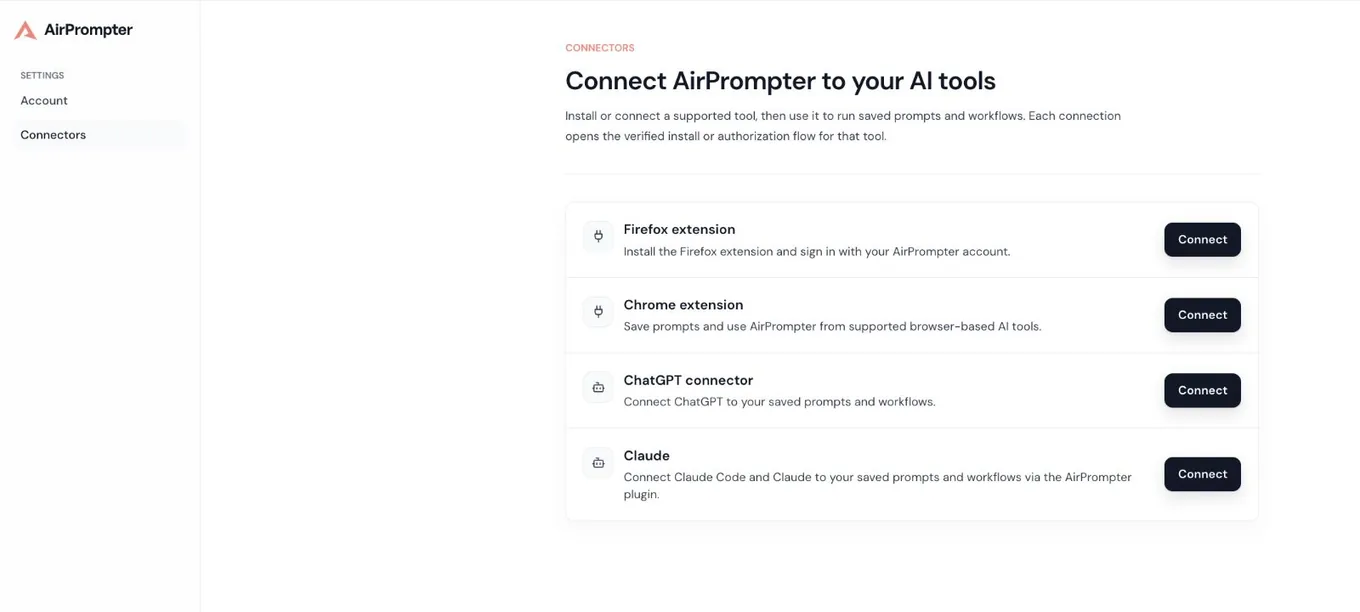
- Review Available connectors and select the card for the host or browser you are actually using.
- Read the description. It identifies whether the action installs an extension, opens a connector authorization flow, or opens a package/skill installation source.
- Select Connect.
- Complete the destination’s verified install or authorization flow.
- When AirPrompter sign-in or OAuth authorization appears, sign in directly to AirPrompter and review the requested permissions.
- Return to the host and confirm that AirPrompter appears among its connected tools or integrations.
Expected result: the host recognizes AirPrompter without requiring you to paste your AirPrompter password, bearer token, OAuth code, or another secret into a general prompt or configuration field.
Understand the current connector cards
The catalog can include different connection types:
Firefox extension or Chrome extension
These cards open the official browser-store path. They support browser-side use rather than a general host MCP connection. Follow the browser extension runbook after installation.
ChatGPT connector
When available, this card opens ChatGPT’s connector settings and starts an authenticated connection. Complete the AirPrompter authorization shown in that flow, then return to the ChatGPT conversation where you want to use it.
Claude
The current card can point to an AirPrompter plugin or skill package. Follow the instructions for the specific Claude surface you use. Skill guidance and live MCP capability are not the same: the actions available depend on that Claude product, the installed package, and its connection support.
Other hosts
Use a Codex, Cursor, VS Code, automation, inspector, or generic MCP path only when it appears in your current connector experience or current first-party setup instructions. Do not invent a server URL or copy credentials from another host’s configuration.
Prove the connection before real work
Run a read-only discovery check first. In the connected host, ask:
Use AirPrompter to list the workflows available to this connection. Do not start one yet.
Then ask for one harmless item:
Find my AirPrompter workflow named "Meeting follow-up test" and tell me which inputs it requires. Do not start it yet.
Check the host’s response:
- it identifies AirPrompter as the tool source;
- it finds the expected workflow or presents a bounded selection;
- it does not expose a workflow from an unrelated account or workspace;
- it names required values without inventing them; and
- it does not start the workflow before your request.
Expected result: discovery works with the intended account and scope before any source material is supplied.
If more than one item matches
Do not let the host guess. Ask it to show the matches, then choose the intended workflow by its complete name or identifier shown by the host.
Run a workflow by name
Start with a complete request:
Run my AirPrompter workflow named "Meeting follow-up test".
Before starting, confirm the matched workflow and ask for every required input.
Then:
- Confirm the intended match.
- Provide only the requested values that are approved for that host.
- Let the host request the first workflow instruction from AirPrompter.
- Review the host’s output before it advances when the host gives you that control.
- If a result is wrong, stop and correct the source input or responsible prompt.
- Continue until AirPrompter reports the run is complete or the host reports a missing input, permission, capability, cancellation, or failure.
Expected result: the host follows the saved AirPrompter order. It does not silently replace the workflow with a generic workflow invented from your request.
Know what AirPrompter and the host each do
| AirPrompter | Connected host |
|---|---|
| Resolves the saved workflow and ordered prompt steps | Provides the model and conversation environment |
| Enforces the connection’s available tools and permissions | Executes returned prompt text |
| Maintains workflow-run continuation state when that run path is used | Supplies host-visible files, images, web access, or other native capabilities |
| Returns selection, missing-input, capability, and terminal states | Shows results and requests user decisions |
This boundary explains why the same workflow can behave differently across hosts. A step that needs web access, an image tool, or a local file can succeed only when the selected host exposes that capability and the necessary source is present.
Use connected authoring safely
Some eligible OAuth connections can expose actions that create or update prompts and workflows.
Before asking the host to save something:
- State whether you want a Prompt or Workflow.
- State the intended account or workspace when the host supports more than one scope.
- Identify values that should remain
{{variables}}for later runs. - Ask the host to summarize the name, description, steps, variables, and destination before saving.
- Resolve any A/B/C selection instead of accepting a guessed item.
- Verify the saved result in the AirPrompter Library.
Write actions require the appropriate OAuth permission and account access. If the host exposes only read/run tools, reconnect through an eligible authorization flow rather than trying to bypass the boundary.
API keys follow a narrower credential policy
A Personal API key can be read-only or, when the target allows it, carry prompts.write for approved Personal run and authoring operations. Organization- and workspace-bound keys remain read-only, and Team writes require OAuth. Do not use a key to bypass a denied Team write or a host connection that is expected to use OAuth. See API keys and scopes.
Personal prompts remain mutable
A connected host can help edit an eligible private personal prompt, but the edit changes that prompt. A run, output, timestamp, or release artifact does not create an immutable personal prompt version.
Apply Connect to day-to-day work
Start a known system in the current conversation
Find and run my AirPrompter workflow "Weekly operating review" using the updates already attached in this conversation. Ask before advancing if a required input is missing.
The host can use its current conversation context, while AirPrompter supplies the saved order and instructions.
Discover the right system without guessing
Search my AirPrompter workflows for customer interview analysis. Show the closest matches and descriptions; do not run one until I choose.
This is safer than asking the host to run “my research workflow” when several workflows share similar names.
Create a reusable system from a repeated task
When write actions are available:
Help me design a three-step AirPrompter workflow for evidence collection, analysis, and a decision brief. Ask which values change each run, show the planned prompts and handoffs, and wait for my approval before saving.
After saving, open AirPrompter and confirm the private Library item, prompt text, variables, and order.
Troubleshooting by symptom
The host cannot find AirPrompter
Return to Connect and repeat the path for that exact host. Confirm the install or authorization completed in the intended account. Do not paste a token into the chat as a workaround.
AirPrompter appears, but no workflows are found
Confirm the AirPrompter account and scope, verify the workflow is private and present in the web Library, then ask for a list without a search term. Rename overly generic workflows.
The authorization expired or was revoked
Use the reconnect path shown by the current host or AirPrompter connector flow. Complete OAuth again and rerun the read-only discovery proof.
A write action is missing
The host package may be read-only, the OAuth permission may not include the required write scope, the account may not be eligible, or the capability may not be available in that rollout. Use the web app to author, or reconnect only through the verified eligible flow.
A step says a capability is unavailable
Read the named requirement. Move the run to a host that exposes that capability, supply the missing file or value in the current host, or use the returned text manually. Do not claim an image, web search, or file operation occurred when it did not.
The host selected the wrong workflow
Stop the run. Ask for matches, choose the intended workflow explicitly, and start a new run. Do not continue a new task with output from the wrong run.
The run stops for missing input
Provide the named value if it is safe and available. If it is not available, cancel or redesign the workflow; generic filler weakens every later step.
The run result differs from the browser extension
Compare host capabilities, model context, variable values, and source attachments. AirPrompter preserves the saved instruction and order; the execution environment still differs.
Completion checklist
- You used the current AirPrompter connector catalog.
- You did not paste a password, token, or OAuth code into a general host field.
- Read-only discovery finds the intended account and workflow.
- Ambiguous matches require your selection.
- You understand which files and capabilities remain host-local.
- You know whether the connection can author or only read/run.
- You know how to reconnect without bypassing permissions.
Next step
If you want visible step controls beside a browser AI chat, use the browser extension. For a qualified manual host configuration, use Direct MCP connections. If you need to improve the saved sequence itself, return to Design and run workflows.