

AirPrompter documentation
Build a reusable prompt library
Write focused prompts, provide the values that change, test realistic inputs, and keep your Library useful as your work evolves.
Available
A reusable prompt preserves the thinking that makes an AI result useful: the job, context, method, boundaries, and output shape. It should work with new source material without forcing you to rewrite the instruction each time.
Before you start
You need an AirPrompter account, one recurring job you can describe by its outcome, and representative input you are allowed to use with your chosen AI service. Decide what must remain fixed and what should change on each run before you write placeholders.
What belongs in a reusable prompt
A chat message can depend on context that happens to be visible in one conversation. A reusable prompt must make its requirements explicit enough to work again.
Use this anatomy:
| Part | Question it answers | Example |
|---|---|---|
| Role | What perspective or responsibility should guide the work? | “You are a careful operations assistant.” |
| Objective | What single result must be produced? | “Turn meeting notes into an action record.” |
| Context | What background or source material is allowed? | Meeting notes supplied at run time |
| Variables | Which values change each run? | {{meeting_notes}}, {{audience}} |
| Method | What steps or decision rules matter? | Separate decisions from proposals |
| Quality bar | What must be true before the result is useful? | Do not invent owners or dates |
| Output format | What exact shape should be returned? | Three headings and an actions table |
You do not need to label every part with those exact words, but the instruction should answer each relevant question.
Use variables for values that change
Write a variable as {{snake_case}}.
Good variable candidates:
{{meeting_notes}}{{target_audience}}{{decision_criteria}}{{source_article}}
Keep stable rules in the prompt instead of turning them into variables. If every sentence becomes a blank to fill, the prompt is no longer convenient to run.
Variable example
Write a decision brief for {{decision_maker}} using {{source_material}}.
Compare the options against {{decision_criteria}}.
On one run, the values might be:
| Variable | Value |
|---|---|
decision_maker | Head of Customer Success |
source_material | Interview notes and renewal data |
decision_criteria | Customer impact, effort, reversibility |
Expected result: the durable instruction stays the same while the decision maker, evidence, and criteria can change.
Create a prompt in AirPrompter
- Sign in and select New Workflow.
- Under What do you want to make?, choose the output family closest to the final result: Text, Data & Code, or Media & Other.
- Choose a specific format, such as Document, Report, Code, Spreadsheet, Image, or another option shown in the wizard.
- Select Continue.
- Choose Single Prompt.
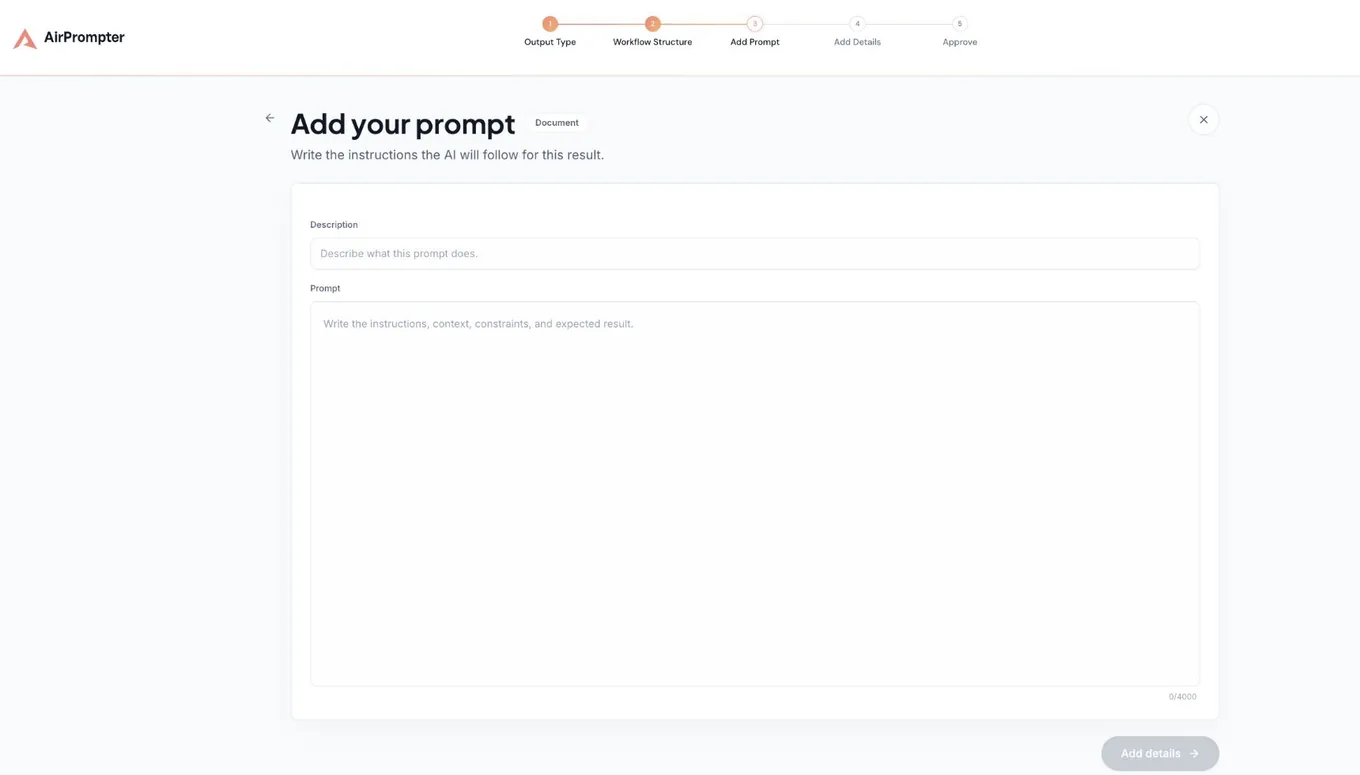
- Add a Description that says when to use the prompt and what it produces.
- Add the complete Prompt instruction, including any
{{variables}}. - Select Add details.
- Add a job-focused Prompt name.
- Choose relevant Categories and Services & platforms.
- Select Continue, inspect the Library card preview and prompt details, then select Save Prompt.
Expected result: AirPrompter saves a private Prompt in your Library. Its card has a recognizable name, and the prompt is available for reuse.
Name prompts for the job
The name should help you select the correct instruction without opening several items.
| Avoid | Prefer | Why |
|---|---|---|
| Research prompt | Compare vendors against criteria | Names the decision job |
| Email helper | Draft renewal follow-up | Names the communication outcome |
| Summarizer | Meeting notes to actions | Names the source and result |
| Final version | Review article claims | Still makes sense after future edits |
Use the description to add the trigger and boundary. For example: “Use after a customer interview to extract themes and evidence; does not write the final roadmap recommendation.”
Three prompts you can adapt
Meeting work: notes to actions
Use when a meeting ends and the next job is an accurate operating record.
Role: You are a careful operations assistant.

Objective: Turn {{meeting_notes}} into a factual meeting record.

Method:
1. Separate confirmed decisions, open questions, and next actions.
2. Preserve stated owners and dates exactly.
3. Mark missing owners as "Not assigned" and missing dates as "Not set".
4. Do not infer commitments that are not present in the notes.

Output:
- Decisions
- Open questions
- A Next actions table with Action, Owner, Due date, and Evidence
Check that every table row can be traced to the notes.
Content work: evidence-backed outline
Use when research is complete and you need a structure before drafting.
Role: You are an editorial strategist.

Objective: Create an outline for {{target_audience}} about {{topic}} using only {{approved_research}}.

Method:
1. State the reader problem and promised outcome.
2. Organize 4–6 sections in a logical learning sequence.
3. Under each section, list the evidence it will use.
4. Mark any required claim that lacks support as "Evidence needed".

Quality bar:
- No invented statistics or sources.
- No section repeats another section's job.
- The outline should support a {{target_length}} draft.

Output only the working title, reader promise, and numbered outline.
Check that every planned claim points to supplied research or says Evidence needed.
Decision work: compare options
Use when several options must be evaluated consistently.
Role: You are a neutral decision analyst.

Objective: Compare {{options}} for {{decision_maker}}.

Use these criteria and only these criteria: {{decision_criteria}}.
Use this evidence: {{source_material}}.

For each option:
- summarize the evidence;
- identify the strongest advantage;
- identify the main risk;
- state what remains unknown.

Finish with a recommendation only if the evidence supports one. Otherwise state what information is needed before deciding.

Output a comparison table followed by Assumptions, Unknowns, and Recommendation.
Check that a recommendation is separated from assumptions and missing evidence.
Test before you depend on it
Do not judge a prompt only by how well it reads. Run it with representative input.
- Choose a normal case from your work.
- Choose a difficult case with missing, conflicting, or messy information.
- Run the same saved prompt against both cases.
- Compare the results with the quality bar in the prompt.
- Record the first instruction that would have prevented each failure.
- Edit the prompt and rerun the same input.
Expected result: the revised prompt fixes a specific failure without weakening a result that was already correct.
Evaluate the result
Use checks that a teammate could apply:
- Correctness: does the output preserve the supplied facts?
- Completeness: are all required sections or fields present?
- Boundaries: did the model avoid unsupported claims or prohibited content?
- Usefulness: can the intended person take the next action?
- Consistency: does the prompt behave acceptably across more than one representative input?
“Sounds better” is not a sufficient test when the prompt supports operational work.
Revise the responsible instruction
| Failure | Change to make |
|---|---|
| Result is too broad | Add audience, scope, maximum length, or exact output fields |
| Facts are invented | Restrict allowed sources and define how to mark unknowns |
| Important fields are missing | List required headings, columns, or keys |
| Tone is wrong but facts are right | Add a bounded tone rule without rewriting the method |
| The prompt has unrelated jobs | Split at the change of responsibility and create a workflow |
| Different runs require constant editing | Replace only the changing values with variables |
| Output is long but not actionable | Ask for prioritized decisions, risks, and next actions |
Change one responsible part at a time when possible. That makes it easier to tell why the next test improved or regressed.
Organize your Library around real work
Your Library contains Prompts and Workflows. Use the controls available in the current Library to make selection fast:
- Collections: group systems by a durable job, client-safe workstream, or project—not by every possible subject.
- Tags: add cross-cutting labels that help search, such as a function, audience, or review type.
- Search: look for the outcome in the item name.
- Filters: narrow the Library to the item type or source you need.
- Favorites: keep high-frequency items close when that control is available on the item.
Examples of useful Collections are Customer research, Weekly operations, and Content production. A Collection named Miscellaneous AI does not help you choose a system under time pressure.
Expected result: a colleague who knows the job—but not the prompt wording—can find the right item by name, Collection, Tag, or search.
Maintain prompts as the work changes
After each failed run
Identify whether the problem came from the input, the instruction, the AI tool, or an earlier workflow step. Edit the prompt only when its durable instruction is responsible.
Weekly for important systems
Review frequently used prompts for repeated corrections, outdated platform choices, unclear names, and requirements that now belong in a separate step.
Before high-impact use
Recheck the prompt with current representative input. Personal prompts are mutable, so confirm the current instruction rather than relying on a remembered earlier state.
Troubleshooting
The variable is not replaced
Confirm that the placeholder uses matching double braces and the value name is consistent: {{target_audience}}, not a mix of {{audience}} and {{target_audience}}.
Results change too much between runs
Add objective checks, allowed sources, required fields, and a clear unknown-data rule. Some model variation remains; a prompt reduces ambiguity but does not make probabilistic output identical.
You cannot tell whether the revision helped
Rerun the original test input and compare against the same acceptance checks. Do not change the input, prompt, and evaluation standard at the same time.
The prompt is difficult to reuse
Remove background that belongs only to one task. Convert the truly changing values into a small set of clear variables. Keep fixed quality rules in the prompt.
The prompt keeps growing
Look for separate responsibilities. Research, drafting, review, and formatting often need different inputs and success criteria. Move those boundaries into a workflow.
Completion checklist
- The name describes the job and outcome.
- The description says when to use the prompt.
- The instruction has one coherent responsibility.
- Changing values use clear
{{snake_case}}variables. - Unknown-data behavior is explicit.
- The output shape is testable.
- The prompt passed a normal and difficult representative case.
- The item is findable in the Library.
Next step
When two or more focused prompts depend on one another, arrange them into a repeatable workflow.